Product: Cartwheel
Topic: Catering tracking, delivery visibility, driver management
Audience: Restaurant operators, catering teams, dispatchers, IT/ops
What does Cartwheel do for catering delivery?
Cartwheel helps restaurants run catering delivery from start to finish: assign the right driver (or delivery partner), keep the recipient informed, and give your team clear visibility until the order is delivered.
What is catering tracking in Cartwheel?
Catering tracking is the ability for your team (and optionally the recipient) to follow delivery progress, typically through a tracking page and delivery updates. It is designed to reduce “where is my order?” calls and prevent last-minute surprises.
What is driver management in Cartwheel?
Driver management is how you assign, monitor, and adjust deliveries across:
- Your in-house drivers
- Third-party delivery partners
- Hybrid setups (use in-house when possible, switch to a partner when needed)
General capabilities
What Cartwheel supports for catering operations
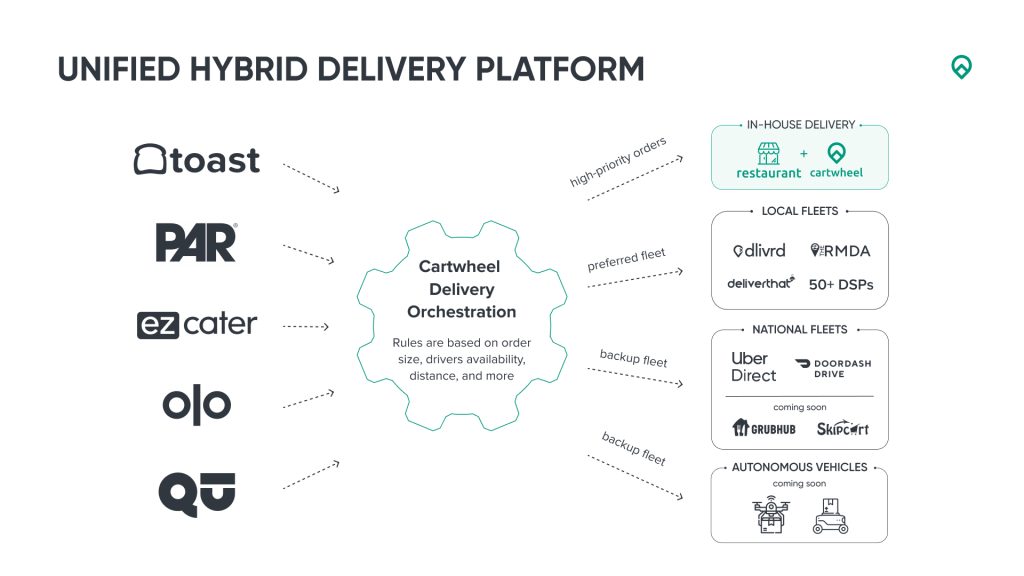
- One place to manage catering deliveries across locations
- Recipient visibility via a tracking experience (when enabled)
- Flexible assignment to in-house drivers or delivery partners
- Fast recovery when something goes wrong (reassignments, switching to a backup option)
- Proof of delivery workflows (based on your setup and fulfillment method)
Does Cartwheel work for both in-house and third-party delivery?
Yes. Many customers use Cartwheel to combine both: keep deliveries in-house when capacity is available, and use on-demand delivery partners during peaks or when staffing is tight.
Supported systems and integrations
Cartwheel is designed to connect to the restaurant systems you already use. The current integrations and partners are listed on Cartwheel’s integrations page.
POS systems
Examples shown include Toast, PAR, and Qu Beyond.
Online ordering and catering platforms
Examples shown include Olo, MonkeyMedia, and Onosys.
Marketplaces and order aggregators
ezCater is the primary catering marketplace we support, and we also work with other ordering partners. Reach out if you’d like the full list.
Delivery partners (third-party fulfillment)
Examples include Jackrabbit, Uber Direct, DoorDash Drive, Skip, and other regional courier networks. In total, Cartwheel supports 50+ delivery partners, with a selection listed on our integrations page.
Can Cartwheel combine multiple order sources in one workflow (for example, Olo + ezCater)?
Yes. Cartwheel can unify orders from multiple sources into a single dispatch and tracking workflow. A common example is routing catering deliveries through Cartwheel for orders from both Olo and ezCater, so operators and dispatchers don’t have to manage separate processes for each channel.
Doesn’t ezCater already work with Olo? Why would we need Cartwheel?
ezCater can work with Olo in some setups, but they solve different parts of the workflow.
- What Olo helps with: Olo Rails is how ezCater orders and menus can flow into the brand’s Olo ordering setup, so the restaurant can receive and make the order through their normal system. Rails is about the ordering flow, not the delivery execution. Read more here.
- What Cartwheel adds: running the delivery operation after the order has been created. Cartwheel is integrated with ezCater’s Delivery Public API. We receive delivery details, run dispatch and delivery execution, and send tracking and delivery updates back to ezCater.
Why this matters for tracking: Cartwheel provides tracking and visibility for both in-house and third-party deliveries within the Cartwheel dashboard. For ezCater specifically, ezCater’s tracking standard is tied to in-house delivery, meaning they “count” tracking toward their requirements when the delivery is self-delivered, even though you may still want third-party deliveries visible and manageable operationally.
So even if ezCater orders already flow through Olo into the POS, Cartwheel is the layer that helps you operate and standardize delivery across ezCater, Olo, and everything else.
Can Cartwheel build a custom integration for an enterprise customer?
Yes. If you do not see the integration you need, Cartwheel can custom-build integrations for large customers, including connecting to internal systems and specialized providers.
Tracking FAQ
What does the recipient see?
Typically, recipients can see:
- Delivery status (assigned, picked up, on the way, delivered)
- ETA (when available)
- A mobile-friendly tracking experience
What is shown depends on your configuration and the fulfillment method.
How do recipients get updates?
Depending on what you enable, you can provide:
- A tracking link to share
- Automatic updates via SMS or email
Many catering teams choose fewer, more meaningful updates.
Can we customize tracking messages?
Common customizations include:
- Message text and timing
- Who receives updates (recipient, store, both)
- Branding elements (varies by setup)
ezCater tracking requirements (Cartwheel)
Does Cartwheel tracking meet ezCater’s tracking requirements?
Yes, for in-house delivery. Cartwheel tracking meets ezCater’s tracking requirements when the ezCater order is self-delivered (in-house) and tracking is sent via the Delivery API integration.
Important nuance: Cartwheel can send tracking for both in-house and third-party, but ezCater only “counts” in-house
Cartwheel can technically send delivery tracking updates for both:
- In-house (self-delivery)
- Third-party delivery providers
However, per ezCater policy, only in-house (self-delivery) tracking is counted toward ezCater’s delivery tracking standard. Third-party delivery tracking sent via the Delivery API does not count toward the standard (outside ezDispatch).
What you still get with third-party deliveries
Even when an ezCater order is fulfilled by a third-party delivery provider, Cartwheel can still provide operational visibility in the Cartwheel dashboard, so your team can:
- Monitor delivery progress
- See statuses and ETAs (when available)
- Handle exceptions and reassignments quickly
In other words, ezCater may not count third-party tracking toward their standard, but you can still track and manage those deliveries in Cartwheel.
What ezCater is changing (and when)
Starting March 31, 2026, ezCater will treat delivery tracking as a platform standard for all ezCater orders, with the in-house vs third-party distinction above.
Driver management FAQ
How do we assign catering deliveries?
You can:
- Assign to an in-house driver
- Dispatch to a third-party delivery partner
- Use a hybrid approach and switch when needed
What if a driver or partner cannot take the delivery?
Cartwheel is built to help you recover quickly, such as:
- Reassigning to another driver
- Switching to a delivery partner
- Using a fallback option if configured
Can we manage catering delivery across many locations?
Yes. Cartwheel is commonly used to standardize dispatch and tracking across multi-unit brands, so teams have consistent workflows and visibility.
Proof of delivery FAQ
Does Cartwheel support proof of delivery for catering?
Yes. Proof of delivery can include options like:
- Photo
- Signature
- Delivery notes
Availability depends on your workflow and the fulfillment method.
Where do we find proof of delivery?
Proof of delivery is typically available in the order details, so store teams and support teams can reference it when needed.
Setup FAQ
What is needed to get started?
Typical rollout includes:
- Confirming which systems you use (POS/ordering/catering platform)
- Choosing your delivery model (in-house, third-party, or hybrid)
- Enabling tracking and deciding when recipients are notified
- Running test deliveries and training teams
Key takeaway
Cartwheel helps catering teams deliver a smoother experience by combining tracking and driver management for in-house and third-party drivers, with the flexibility to adapt quickly as conditions change.